
Error 2201, 2021, 2303
When it shows up: Players report this when trying to upgrade a specific unit (seen most often with units like Valiant Mk II and Recruiter) and the upgrade doesn't seem to register.
Likely cause: Appears to be a client-side display/sync issue — the unit's actual level on the account is often already correct, it just isn't reflecting properly on screen.
Suggested steps:
- Refresh the game (or fully reload the client).
- Clear browser cache/cookies if refreshing alone doesn't fix it.
- Check the unit again after refreshing — in most cases the correct level was already there.
If that doesn't resolve it: Some cases have needed a manual account-side correction from an agent. If refreshing doesn't fix it, this should go to a human rather than looping the player through more self-serve steps.
__________________________________________________________________
Error 2181, 2182
When it shows up: Players see this while trying to add or build new units, sometimes alongside a disconnect.
Likely cause: Unit storage being full for a specific unit type — when there's no space, the game won't allow additional units of that type to be created, repaired, or received. In some cases this has also been linked to a connection interruption during a save.
Suggested steps:
- Check unit storage/inventory for the affected unit type.
- Scrap or move unused units (e.g., to the Armory) to free up space.
- Retry the build/repair/receive action.
__________________________________________________________________
"Purchasing is blocked for this account"
When it shows up: Players see this when trying to purchase gold on KIXEYE.com
Likely cause: Purchase chargebacks or disputes -or- Suspicious purchase history.
Suggested steps:
- Ensure you are logged into the correct account.
- If you have any open disputes, close or cancel these. While these are open, purchasing will be blocked.
- If a dispute or chargeback completes and refunds money, purchasing will remain blocked on the account until it is repaid. Contact support or the payment process for more information.
________________________________________________________
"Invalid Platoon"
When it shows up: Deploying platoon to the world map
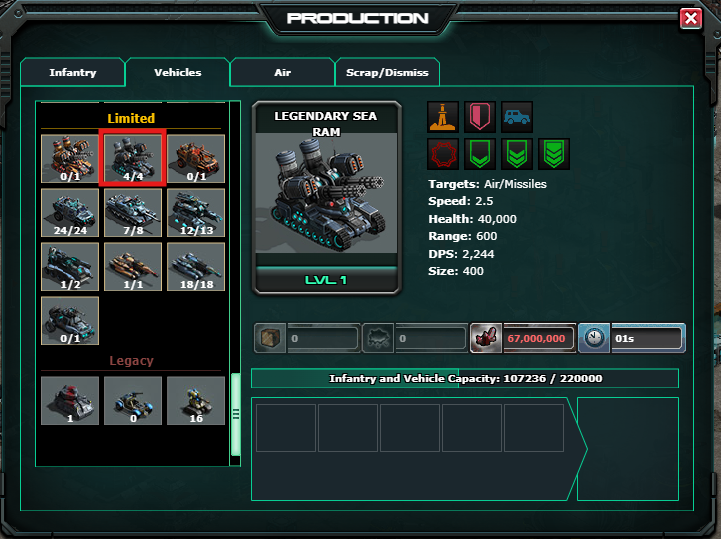
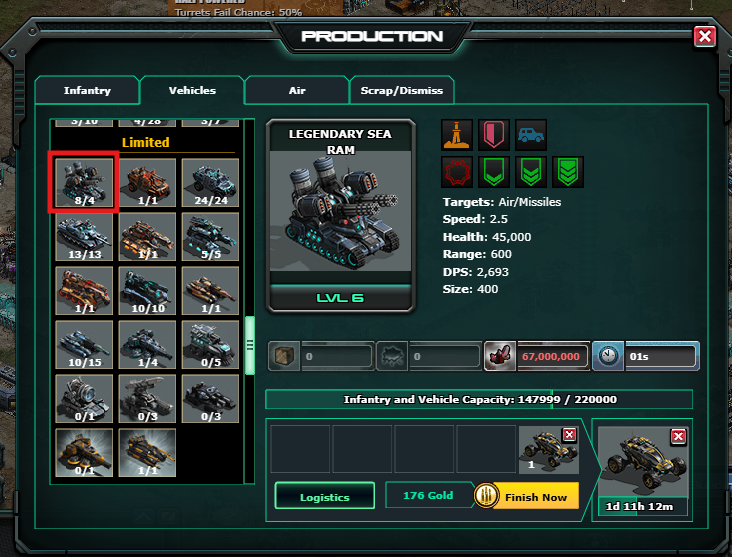
Likely cause: The number of units built is higher than the number you own.
Suggested steps:
- Go to your War Factory and select the unit you are checking.
- In the unit's build panel, look for the numbers that show how many you have built versus your total limit.
- The images below show the difference between a correct and an incorrect count:
__________________________________________________________________
"No Platoons Nearby"
When it shows up: Players see this when clicking "Attack" on the world map.
Likely cause: No platoons are near the base, or the wrong type of platoon is present.
Suggested steps:
- Sector Breach: You must use Assault platoons to attack the bases; unlock these by building the Go-Go Bar in your base.
- Player Base: You must use PVP platoons to hit other player bases.